
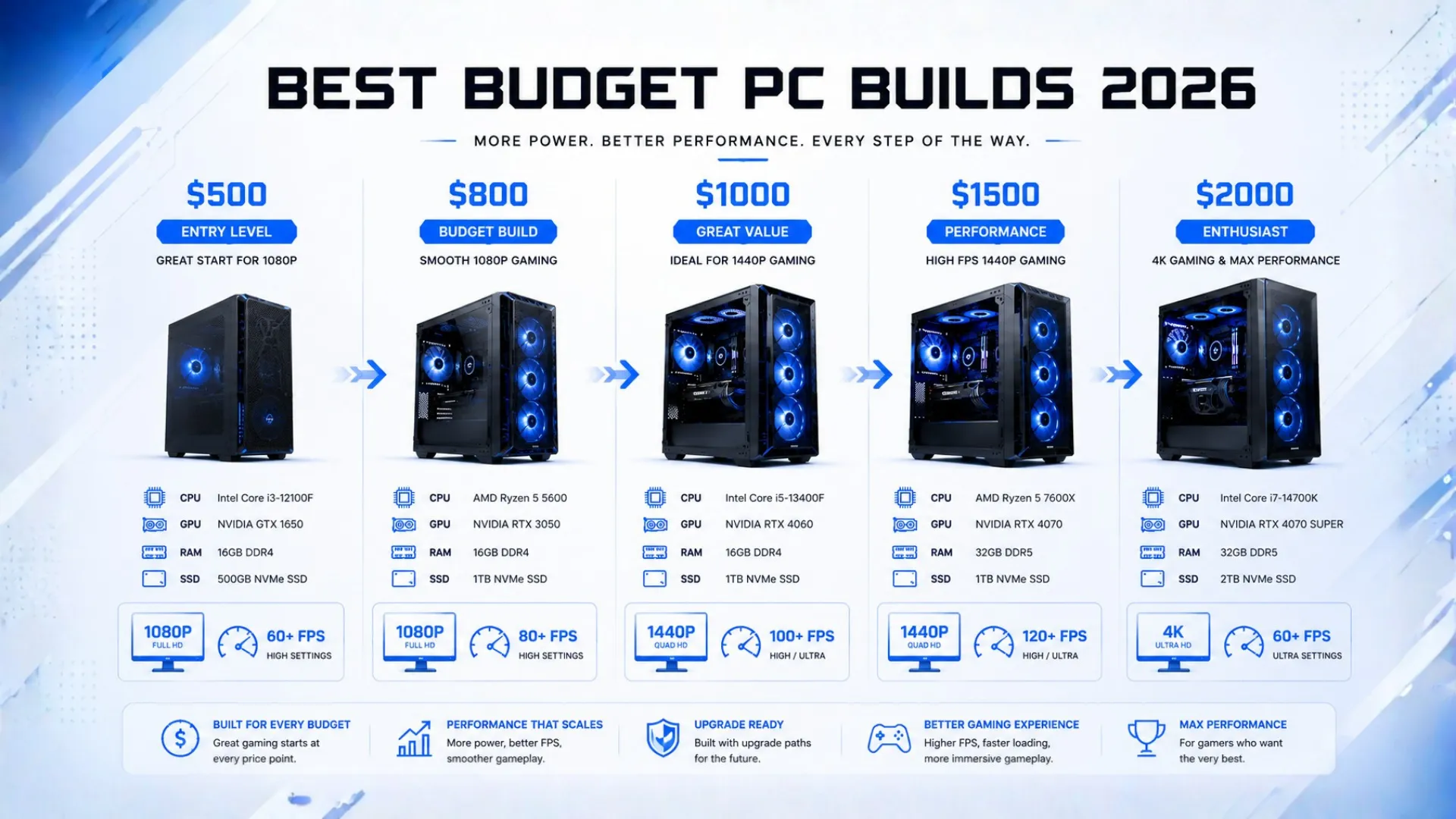
Budget PC Build Guide: The Best Builds by Price (2026)
A budget PC build is all about getting the most performance for your money, and in 2026 you can build a great gaming PC for less than you might think. This guide lays out the best builds at each price point, from a true $500 starter to a $2,000 powerhouse, with full parts lists you can buy today.
Each build is balanced so no part is wasted, and tuned for the best value at its price. Find your budget below and you have your shopping list. Every key part links to Amazon for the live price.
How to Get the Most From a Budget PC Build
The secret to a great budget PC build is spending smart, not just cheap. A few rules guide every build below:
- Put the most money into the graphics card, since it drives gaming frame rates more than any other part.
- Match the build to your monitor. A budget build is happiest at 1080p, where it delivers high frame rates.
- Choose a platform with an upgrade path, so you can add a faster chip or card later.
- Do not skimp on the power supply, since a cheap, low-quality unit can risk your whole build.

Check any pairing stays balanced with our bottleneck calculator, and new to the parts? See our PC parts explained guide, then our how to build a PC walkthrough when your parts arrive.
The $500 Build: Entry-Level 1080p
The true budget starter. At this price the smart move is the older, cheaper AM4 platform with DDR4, which frees up money for a capable graphics card. It runs esports titles fast and modern games at 1080p with adjusted settings.
- CPU: AMD Ryzen 5 5600 — check price
- GPU: Intel Arc B580 — check price
- RAM: 16GB DDR4-3600 — check price
- Storage: 1TB NVMe SSD — check price
- PSU: 550W 80 Plus — check price
Best for: first builds, esports, and the tightest budgets.

The $800 Build: Solid 1080p Gaming
The value sweet spot for many builders. Moving to the modern AM5 platform, this build runs new games at 1080p high settings with strong frame rates and gives a long upgrade path.
- CPU: AMD Ryzen 5 7600 — check price
- GPU: NVIDIA RTX 5060 — check price
- RAM: 16GB DDR5-6000 — check price
- Storage: 1TB NVMe SSD — check price
- PSU: 550W 80 Plus — check price
Best for: a modern, upgradeable 1080p high-refresh build.
The $1,000 Build: 1080p Ultra and Entry 1440p
Stretching to $1,000 buys a noticeable jump, with smooth 1080p ultra and a real step into 1440p gaming. A great all-round value build.
- CPU: AMD Ryzen 5 9600X — check price
- GPU: AMD RX 9060 XT 16GB — check price
- RAM: 32GB DDR5-6000 — check price
- Storage: 1TB NVMe SSD — check price
- PSU: 650W 80 Plus — check price
Best for: 1080p ultra and entry-level 1440p gaming.

The $1,500 Build: Strong 1440p Gaming
This build crosses into genuine 1440p territory at high to ultra settings, with frame rates that stay well above 60 in demanding games. The choice for serious value at 1440p.
- CPU: AMD Ryzen 5 9600X — check price
- GPU: NVIDIA RTX 5070 or RX 9070 XT — check price
- RAM: 32GB DDR5-6000 CL30 — check price
- Storage: 2TB NVMe SSD — check price
- PSU: 750W 80 Plus Gold — check price
Best for: high-refresh 1440p gaming with headroom.

The $2,000 Build: 1440p Ultra and 4K
At $2,000 you get a build that dominates 1440p at high refresh and plays 4K at ultra with strong frames. It pairs the best gaming chip with a high-end card for years of top performance.
- CPU: AMD Ryzen 7 9800X3D — check price
- GPU: NVIDIA RTX 5080 — check price
- RAM: 32GB DDR5-6000 CL30 — check price
- Storage: 2TB NVMe SSD — check price
- PSU: 850W 80 Plus Gold — check price
Best for: 4K gaming, 1440p 240Hz, and streaming.

Budget Builds at a Glance
| Budget | CPU + GPU | Target |
|---|---|---|
| $500 | Ryzen 5 5600 + Arc B580 | Entry 1080p |
| $800 | Ryzen 5 7600 + RTX 5060 | 1080p high |
| $1,000 | Ryzen 5 9600X + RX 9060 XT | 1080p ultra, entry 1440p |
| $1,500 | Ryzen 5 9600X + RTX 5070 | 1440p high |
| $2,000 | Ryzen 7 9800X3D + RTX 5080 | 1440p ultra, 4K |
Prices move, so tap any part for the live price. For builds organized by resolution instead of price, see our main gaming PC build guides.

Where to Save and Where Not To
A budget PC build is about smart trade-offs. Here is where to save and where to spend:
- Save on: the case (looks do not affect performance), RGB lighting, and going DDR4 on the cheapest builds.
- Spend on: the graphics card first, a quality power supply, and enough memory at 16GB or ideally 32GB.
- Consider used or refurbished for the graphics card to stretch a tight budget, as our PC parts explained guide covers safely.

Before buying, confirm your parts fit and work together with our PC compatibility checker, and size your power supply with the PSU calculator.
Frequently Asked Questions
What is the best budget PC build in 2026?
For most people, the $800 build with a Ryzen 5 7600 and RTX 5060 is the best value, running modern games at 1080p high settings on the upgradeable AM5 platform. The $500 build is the cheapest capable starting point.
Can you build a gaming PC for $500?
Yes. A $500 build with a Ryzen 5 5600 and Intel Arc B580 on the older AM4 platform runs esports titles fast and modern games at 1080p with adjusted settings. It is a great upgradeable starting point.
How much is a good budget gaming PC?
A capable budget gaming PC starts around $500 for entry 1080p, with the sweet spot around $800 for smooth 1080p high settings. Around $1,000 gets you into entry 1440p gaming.
What is the best $2000 PC build?
A Ryzen 7 9800X3D with an RTX 5080, 32GB of DDR5-6000, and a quality 850W power supply is an excellent $2,000 build. It dominates 1440p at high refresh and plays 4K at ultra settings.
Should I use DDR4 or DDR5 for a budget build?
For the cheapest builds, the older AM4 platform with DDR4 saves money for a better graphics card. For $800 and up, the modern AM5 platform with DDR5 is worth it for the upgrade path.
Where should I spend the most on a budget build?
Put the most into the graphics card, since it drives gaming frame rates. Do not skimp on the power supply either. You can save on the case, lighting, and by choosing DDR4 on the tightest builds.


