
PC Bottlenecks Explained: What They Are and Why They Slow You Down?
So what is a PC bottleneck, really?
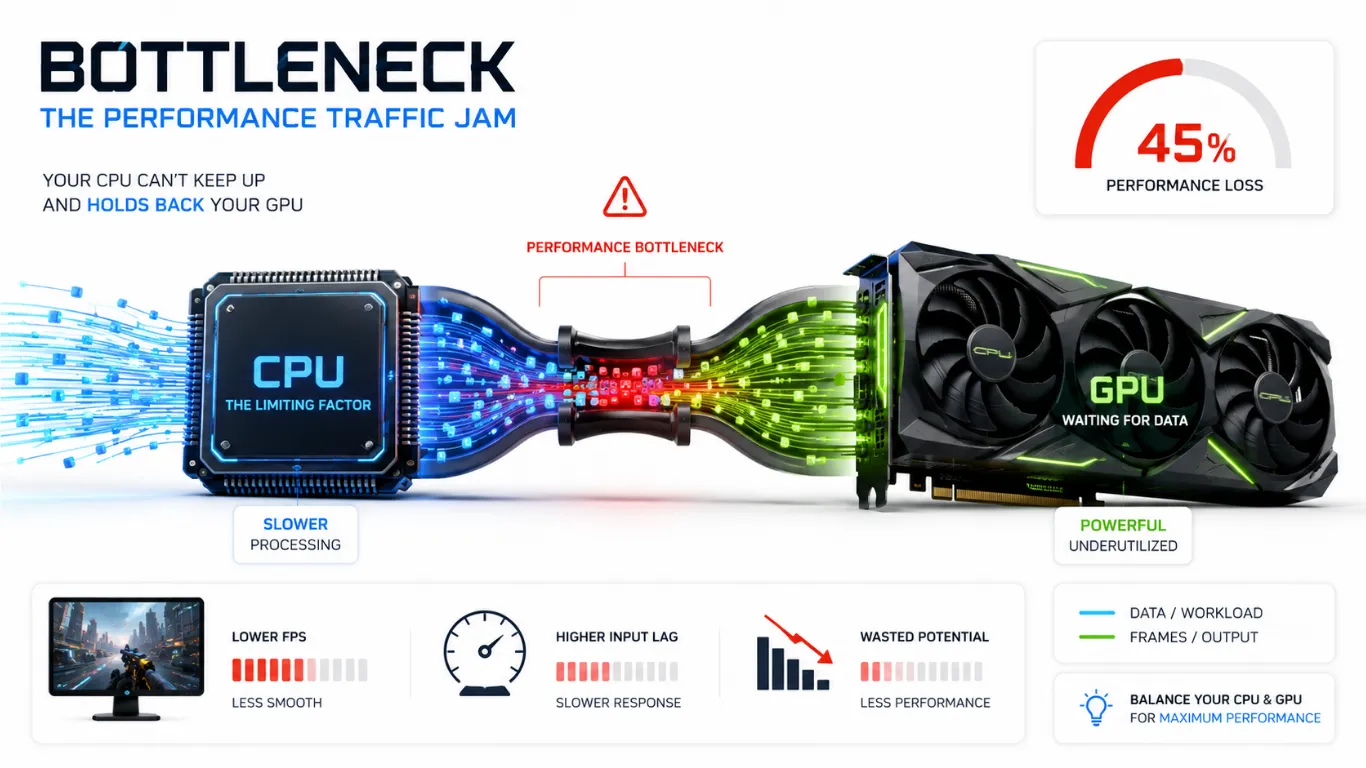
In plain words, a bottleneck is when one part of your computer is too slow to keep up with the others, so it holds back your whole system. Picture a fast graphics card stuck waiting on a slow processor. The card could do more, but it cannot, because it is waiting. That wasted power is the bottleneck.
It is one of the most common reasons a PC feels slower than its price tag suggests, and the good news is that it is easy to understand and often easy to fix.
What Is a PC Bottleneck in Simple Terms?
Your PC is a team. The processor (CPU) and the graphics card (GPU) have to work together to put frames on your screen. When both parts are matched well, the team runs smoothly. When one part is much weaker than the other, the weak part sets the pace for everyone, just like the slowest runner sets the pace for a group.
That slow part is the bottleneck. It does not mean your PC is broken. It means one part cannot feed the others fast enough, so you lose performance you already paid for. The size of that gap is something you can measure with our bottleneck calculator, but first it helps to understand why it happens.
A Simple Way to Picture It
Think of a bottle of water turned upside down. The water inside is your PC’s power. The narrow neck of the bottle controls how fast that water can pour out. It does not matter how much water is in the bottle, the thin neck decides the speed. That neck is the bottleneck. In a PC, the weakest part is the neck, and it limits how fast everything else can flow.

This is why a strong graphics card paired with a weak processor still feels slow. The processor is the narrow neck, and it caps what the rest of the system can do.
What Causes a PC Bottleneck
Bottlenecks come from a mismatch. One part is built for a much higher level than the part next to it. Here are the most common causes.

- A new graphics card added to an older, slower processor
- A strong processor paired with a budget graphics card
- Too little memory, or memory that runs too slow for modern games
- Playing at a resolution that does not match your parts, like a fast competitive game at a setting that leans on a weak CPU
- An old part left behind during a partial upgrade
Most bottlenecks trace back to upgrading one part while leaving another behind. That is normal, and it is exactly what a balance check is for.
Types of PC Bottlenecks
Not every bottleneck is the same. Knowing the type points you straight to the fix. Here are the main ones in plain language.

| Type | What Happens | Common Sign |
|---|---|---|
| CPU bottleneck | The processor cannot feed the graphics card fast enough. | GPU usage is low while CPU usage is near 100%. |
| GPU bottleneck | The graphics card cannot keep up with the visuals. | GPU usage is near 100% in heavy scenes. |
| RAM bottleneck | Memory is too small or too slow for the task. | Stutters and long load times when multitasking. |
| Resolution mismatch | Your settings push the wrong part too hard. | Big FPS swings when you change resolution. |
CPU Bottleneck vs GPU Bottleneck
These two are the most common, so they deserve a clear split. A CPU bottleneck means your processor is the slow part. It cannot prepare frames quickly enough, so your graphics card waits and your FPS drops. A GPU bottleneck is the opposite. Your processor is ready, but your graphics card cannot draw the visuals fast enough.

Telling them apart matters because it decides where your money should go. Buying a new graphics card will not help a CPU bottleneck, and a faster processor will not fix a GPU bottleneck. To see which side is the problem on your own build, run both parts together in our CPU and GPU bottleneck calculator.
How to Tell If Your PC Is Bottlenecked
You can spot a bottleneck without any tools, just by watching your PC during a game. Look for these signs.
- Your graphics card sits at low usage while your frame rate feels capped
- Your processor stays pinned near 100 percent while the GPU coasts
- Frame rates jump around a lot in busy scenes with lots of action
- A new, powerful part did not give you the boost you expected
- Loading and multitasking feel slow even though your main parts are strong
If you notice these, the next step is to measure the gap so you know how serious it is. Our guide on what counts as a good bottleneck percentage shows you which numbers are normal and which ones are worth fixing.
How to Fix or Reduce a PC Bottleneck?
Here is the part you came for. Fixing a bottleneck usually means either easing the load on the weak part or upgrading it. Start with the free options.

- Change your resolution to shift the load. A higher resolution leans on the graphics card, a lower one leans on the processor.
- Lower the in-game settings that hammer the weak part, like draw distance and shadows for the CPU, or textures and effects for the GPU.
- Close background apps that eat processing power while you game.
If a free fix is not enough, upgrade the weak part, not the strong one.
- For a graphics card upgrade, start with the best graphics cards for gaming.
- For a processor that cannot keep up, the most common CPU bottlenecking GPU fix is a faster chip. Check where yours ranks in the CPU performance hierarchy.
- If memory is the issue, our how much RAM you need guide helps you pick the right amount and speed.
Is Some Bottleneck Normal?
Yes, and this is important. Every PC has a small bottleneck because no two parts are matched perfectly. A gap of a few percent is completely normal and you will never feel it. The goal is not zero. The goal is to keep the gap small enough that it does not steal frames you care about. If you want the exact safe ranges, our guide on acceptable bottleneck percentage breaks down every result.
Frequently Asked Questions
What is a PC bottleneck in simple terms?
It is when one part of your PC is too slow to keep up with the others, so it limits your whole system. The weak part sets the pace, and you lose performance you paid for.
What causes a bottleneck in a PC?
A mismatch between parts causes it, like a strong graphics card paired with an older, slower processor. Too little or too slow memory can cause one too.
Is a PC bottleneck bad?
A small one is normal and harmless. A large one wastes the power of your stronger part, and that is when it is worth fixing.
How do I know if my CPU is bottlenecking my GPU?
Watch your usage during a game. If your graphics card sits at low usage while your processor stays near 100 percent, your CPU is likely the bottleneck.
Can you fully remove a PC bottleneck?
Not completely, because some gap always exists. You can shrink it with settings changes or by upgrading the weak part until it no longer holds you back.
How do I fix a CPU bottlenecking my GPU?
Lower CPU-heavy settings, raise your resolution to shift load to the graphics card, or upgrade to a faster processor that matches your card.
Similar Posts
RAM Bottleneck Calculator: Free Memory Check 2026
Is Your Memory Slowing You Down? Check With the RAM Bottleneck Calculator Most people only think about their processor and graphics card, but memory can quietly hold a PC back too. If your RAM is…
How to Check PC Bottleneck: Easy 2026 Guide
How to Check If Your PC Has a Bottleneck If your PC feels slower than it should, there is a simple way to find out why. Learning how to check PC bottleneck shows you whether…
CPU Bottleneck Calculator: Check and Fix It 2026
Is Your Processor Holding Back Your PC? Find Out and Fix It A slow processor is one of the most common reasons a powerful graphics card never reaches its full speed. When your CPU cannot…
GPU Bottleneck Calculator: Check and Fix It 2026
Is Your Graphics Card the Weak Link? Check and Fix a GPU Bottleneck When your graphics card cannot keep up with the rest of your PC, your frame rate drops and your games feel less…
What Is Counted As Acceptable Bottleneck Percentage? 2026 Guide
What Counts as a Good Bottleneck Percentage on Your PC? You ran the numbers and got a result from the bottleneck calculator, but now you are stuck on the real question: is that number good…
CPU and GPU Bottleneck Calculator: Free Check 2026
Check If Your CPU and GPU Are a Good Match Your processor and graphics card are the two parts that decide your frame rate, and they have to work as a pair. If one is…


